


You’re staring at a blank screen. You’ve decided to start a blog — maybe on Blogspot, maybe on WordPress — but you’re stuck on the most basic question: what should a blog post actually look like?
Not the writing part. The structure. The layout. The visual presentation that makes someone stop scrolling and actually read what you wrote.
A sample of a blog post isn’t just about paragraphs and headings. It’s about how the entire page feels — the template framing your content, the spacing between elements, the way images and text work together, and how naturally a reader flows from headline to conclusion. Get this wrong and even brilliant writing gets ignored. Get it right and average writing performs above its weight.
In this guide, I’ll show you what makes a great blog post structure, review real examples across different blogspot themes and layouts, and recommend a template that handles the visual heavy lifting so you can focus entirely on your content.
What Does a Great Blog Post Actually Look Like?
Before choosing a theme or writing a single word, you need to understand the anatomy of a blog post that performs well — both for readers and search engines. Here’s what every well-structured sample blog website post includes:
| Element | Purpose | SEO Impact |
|---|---|---|
| Compelling headline (H1) | Grabs attention, sets expectation | Primary keyword placement |
| Featured image | Visual hook, social sharing preview | Image SEO, engagement signal |
| Opening paragraph | Hooks reader within 3 seconds | Keyword in first 100 words |
| Table of contents | Easy navigation for long posts | Jump links in SERP, featured snippets |
| Subheadings (H2, H3) | Break content into scannable sections | Semantic structure for crawlers |
| Short paragraphs | Readability, mobile friendliness | Lower bounce rate |
| Lists and tables | Visual variety, quick scanning | Featured snippet eligibility |
| Internal links | Guide readers to related content | Distributes authority, improves crawling |
| Call to action / conclusion | Tells reader what to do next | Engagement, conversion signal |
Now here’s the part most beginner bloggers miss: every single one of these elements is affected by your theme. A poorly coded blogspot theme can mess up heading hierarchy, break mobile layouts, load images slowly, and make your beautifully written content look amateur. The template does more work than most people realize.
Sample Blog Post Structures That Actually Work
Let me walk through the three most effective blog post formats. Each works best for specific content types:
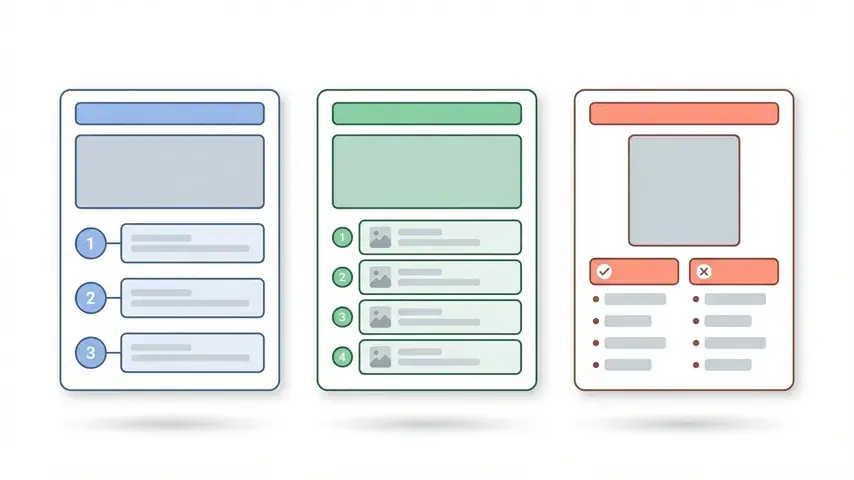
Format 1: The How-To Post
Structure: Problem → Solution overview → Step-by-step instructions → Summary
- H1: Clear how-to headline with keyword
- Opening: Describe the problem the reader has
- H2 sections: Each step as its own section with detailed instructions
- Visuals: Screenshots or illustrations at each step
- Conclusion: Quick recap and next action
Best for: Tutorials, guides, technical walkthroughs. These have the highest chance of earning featured snippets.
If you’re running a WordPress blog alongside Blogspot, mastering visual elements like featured images makes a big difference. Our tutorial on setting featured images in WordPress walks through the optimization side that most bloggers overlook.
Format 2: The Listicle
Structure: Introduction → Numbered items with descriptions → Conclusion
- H1: “X Best/Top [Topic]” with keyword
- Opening: Why this list matters, what criteria you used
- H2 sections: Each list item with honest pros, cons, and your take
- Comparison table: Quick overview for scanners
- Conclusion: Your top pick and why
Best for: Product comparisons, tool roundups, resource collections. High shareability and strong commercial intent.
Format 3: The Opinion/Review Post
Structure: Context → Detailed analysis → Verdict
- H1: Product/topic name with review angle
- Opening: Your relationship with the topic, why you’re qualified to review
- H2 sections: Features, performance, pricing, alternatives
- Verdict: Clear recommendation with reasoning
Best for: Product reviews, template reviews, service evaluations. If you’re exploring blogging platforms, our SmartMag Blogspot template review is a good example of this format in action — detailed analysis, honest verdict, practical takeaways.
Why Your Blogspot Theme Determines Your Blog Post Quality
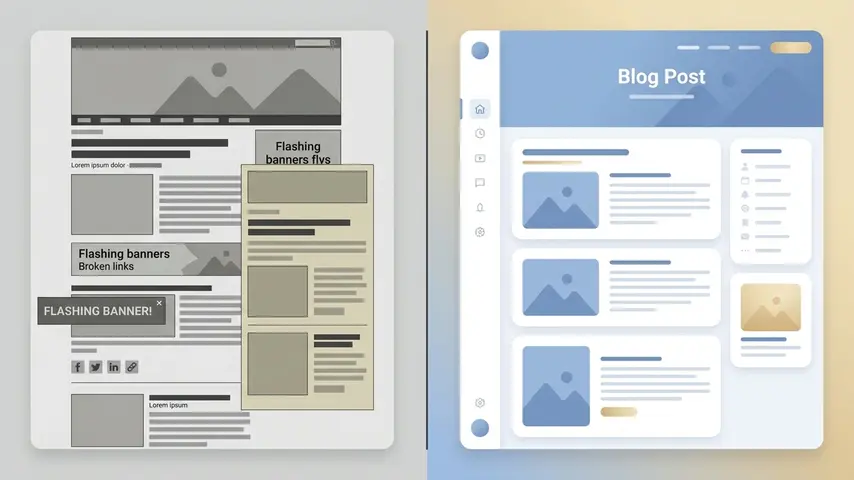
Here’s what I mean when I say the template matters more than most people think. Take the exact same blog post — same words, same images, same structure — and publish it on two different blogspot themes. The results will be dramatically different.
On a well-designed theme:
- Text is readable with proper line height and font sizing
- Images are lazy-loaded and display at correct aspect ratios
- The table of contents generates automatically from your headings
- Related posts appear naturally at the bottom, keeping readers engaged
- Ads integrate without breaking the reading flow
- Mobile users see a clean, fast-loading version — not a shrunken desktop mess
On a poorly designed theme:
- Text feels cramped or stretched depending on screen size
- Images load all at once, tanking page speed
- No table of contents — readers have to scroll blindly
- Related posts are either broken or show duplicates
- Ads overlap content or push it below the fold
- Mobile experience ranges from “mediocre” to “unusable”
Your content deserves a template that presents it properly. That’s not a luxury — it’s a basic requirement for any sample blog website that wants to rank and retain readers.
Recommended Template: SEO Next — Flexible & Blog Blogger Template
After testing numerous Blogger templates — both for blog-style content and magazine-style publishing — the one that consistently delivers the best post presentation and technical performance is SEO Next.
What makes SEO Next different from the dozens of “premium” Blogspot themes I’ve evaluated? It’s the depth of optimization under the surface. The developers built a custom native feed system that loads content sections significantly faster than Blogger’s default feed mechanism — which tends to be sluggish and inconsistent. That alone sets it apart from virtually every competing template.
But what really sold me is how blog posts look and perform on this template. The reading experience is clean and distraction-free. Headings render with proper hierarchy. The built-in table of contents generates seamlessly from your H2 and H3 tags. And the content pagination feature — which splits longer posts into pages — is genuinely clever for increasing engagement time and ad impressions without feeling manipulative.
Core Features That Matter for Blog Posts
- Lightning-fast rendering — Custom native feed system loads featured sections in milliseconds, not the typical Blogger lag
- Content pagination (post split) — Break long posts into pages to increase time-on-site and impression rates naturally
- Automatic table of contents — Generated from your headings without manual shortcodes
- Unlimited post card layouts — Display your content in different visual formats across categories and homepage
- Premium button and shortcode system — Add styled call-to-action buttons, info boxes, and custom elements directly in posts
- Ajax mega menu — Smooth, professional navigation that loads content dynamically without full page reloads
- 5+ custom featured post sections — Highlight your best content prominently with multiple layout options
- Dark mode with dark logo — One-tap switching between light and dark themes with automatic logo swap
- Complete RTL support — Auto-translate layout direction for Arabic, Hebrew, Persian, and other right-to-left languages
- Unlimited ad zones — Including custom in-post ad code placement, header ads, sidebar ads, in-feed ads, and footer zones
- Facebook and Disqus comments — Multiple commenting systems to match your audience preference
- Exclusive subscribe form — Built-in email capture without external widget dependencies
- No encrypted scripts — Completely transparent code; you can inspect and understand everything in the template
- Lifetime updates — The template evolves with Blogger platform changes; you don’t get left behind
- No coding required — Every feature is configurable through Blogger’s standard layout interface and custom shortcodes
Recommended Template
SEO Next — Flexible & Blog Blogger Template
Fast loading • SEO optimized • AdSense ready • Dark mode • RTL support
Live Demos
Lifetime updates • No encrypted code • Full documentation
How to Structure Your First Blog Post (Using Any Template)
Whether you choose SEO Next or another quality theme, the structure of your actual blog post content matters just as much as the template displaying it. Here’s a practical framework for your first post:
Step 1: Start With a Hook, Not an Introduction
Don’t open with “In this blog post, I will discuss…” — nobody wants to read that. Start with a question, a surprising fact, or a relatable scenario that makes your reader think “yes, that’s exactly my situation.”
Step 2: Break Everything Into Scannable Sections
Use H2 headings every 200–300 words. Nobody reads blog posts top to bottom anymore. People scan, find the section relevant to them, and read that. Make scanning easy.
Step 3: Use One Visual Element Per Scroll
An image, a table, a bulleted list, a blockquote — something visual should appear within every two scrolls on mobile. Text-only walls kill engagement no matter how good the writing is.
Step 4: End With Direction
Tell the reader what to do next. Read another post. Try a tool. Apply what they learned. A blog post without a clear next step is a dead end — and dead ends have high bounce rates.
Free vs. Premium Blogspot Themes — Is Paying Worth It?
This is the question every new blogger asks. Here’s the honest breakdown:
- Free themes work for learning and experimenting. They’ll get you published. But they typically have bloated code, limited ad placement options, poor mobile optimization, and no developer support when things break.
- Premium themes like SEO Next are investments in performance. Faster loading, cleaner code, better SEO structure, flexible monetization, ongoing updates, and actual support. If you’re serious about building a sample blog website that grows, the template is the one place where spending $30–$50 upfront saves you hundreds in lost traffic and revenue later.
Think of it this way: you wouldn’t open a physical store and use cardboard shelves because they’re free. Your blog template is your store’s interior. Make it reflect the quality of what’s inside.
Frequently Asked Questions
What should a sample of a blog post include?
A well-structured blog post should include a compelling headline, an engaging opening paragraph, organized subheadings, short readable paragraphs, at least one visual element per scroll (images, tables, lists), internal links to related content, and a clear conclusion with a call to action. The structure matters as much as the content itself.
What are the best blogspot themes for blog posts?
The best Blogspot themes for blog content are fast-loading, mobile-responsive, SEO-optimized, and designed to make long-form reading comfortable. Look for built-in features like automatic table of contents, related posts, clean typography, and flexible ad placement. Templates like SEO Next are specifically engineered for blog post presentation and search engine performance.
Do I need a premium theme to start a blog?
You don’t need one to start, but you’ll likely need one to grow. Free Blogspot themes work for testing ideas and learning the platform. However, their limitations in speed, SEO structure, ad support, and mobile optimization become significant barriers once you’re trying to attract consistent traffic and monetize your content.
How long should a blog post be for SEO?
There’s no universal answer, but data consistently shows that posts between 1,000 and 2,000 words tend to rank best for informational queries. Quality matters more than length — a focused 1,200-word post will outrank a padded 3,000-word one. Write until you’ve thoroughly covered the topic, then stop.
What’s the difference between a blog post and a blog page?
Blog posts are time-stamped content entries that appear in your blog feed chronologically — articles, tutorials, reviews. Blog pages are static content — your About page, Contact page, Privacy Policy. Posts drive organic traffic through search. Pages provide essential site information. Both need proper structure, but posts are where your SEO growth happens.
Can I use the same blog post structure on Blogspot and WordPress?
Absolutely. The structure of a great blog post — headline, hook, subheadings, visuals, conclusion — is platform-independent. What changes is the template rendering that structure. A quality Blogspot theme and a quality WordPress theme both present content effectively, just on different platforms with different underlying systems.
Your blog post structure is the skeleton. Your writing is the muscle. Your template is the skin. All three need to work together for a blog that looks professional, reads naturally, and ranks well.
Start with a proven structure, choose a template built for performance, and focus your energy on writing content worth reading. Everything else follows from there.


