
Working from home sounded like a dream until you found yourself juggling seven browser tabs, three messaging apps, a video call that keeps freezing, and a to-do list scattered across sticky notes, emails, and random text files.
Sound familiar? The problem isn’t remote work itself. It’s using the wrong tools — or too many of them.
The right remote work tools don’t just keep you connected. They eliminate chaos, protect your focus time, and make collaboration feel effortless even when your team is spread across five time zones. In this guide, I’ll break down the best tools for remote work in 2025 across every category that actually matters — communication, project management, design, file sharing, security, and focus.
No fluff. No affiliate-stuffed lists of 50 tools nobody uses. Just the ones that genuinely make remote work… work.
Why Choosing the Right Remote Working Tools Matters More Than You Think
Here’s something most “best tools” articles won’t tell you. The biggest productivity killer in remote work isn’t distraction. It’s tool fragmentation.
When your communication lives in Slack, your tasks live in email, your files live in Google Drive, your meetings live in Zoom, and your notes live in a random app you downloaded six months ago — your brain spends more energy switching contexts than actually doing work.
Research from the American Psychological Association shows that context switching can cost up to 40% of your productive time. Forty percent. That’s nearly half your workday lost to toggling between apps.
The goal isn’t to find the “best” tool in every category. It’s to find remote working tools that integrate well together, reduce switching, and match how you actually work — not how some productivity guru on YouTube says you should work.
Best Tools for Remote Work in 2025 — By Category

1. Communication & Messaging
Clear communication is the backbone of every remote team. Without hallway conversations and desk drop-bys, your messaging tool becomes your virtual office.
| Tool | Best For | Free Plan? |
|---|---|---|
| Slack | Team messaging, channels, integrations | Yes (limited history) |
| Microsoft Teams | Teams already using Microsoft 365 | Yes |
| Discord | Casual teams, communities, voice channels | Yes |
My honest take: Slack is the standard for a reason — its integrations with other remote work tools are unmatched. But if your company already pays for Microsoft 365, Teams is the smarter pick because it eliminates one more subscription. Discord is underrated for small, creative teams who want always-on voice channels without the formality.
2. Video Conferencing
Sometimes text isn’t enough. Complex discussions, brainstorming sessions, and team bonding all need face-to-face interaction — even if it’s through a screen.
| Tool | Best For | Standout Feature |
|---|---|---|
| Zoom | Reliable calls, large meetings, webinars | Breakout rooms, recording |
| Google Meet | Quick calls, Google Workspace users | No download needed |
| Loom | Async video messages instead of meetings | Record & share in seconds |
Pro tip: The best meeting is the one that didn’t need to happen. Before scheduling a Zoom call, ask yourself: “Could this be a Loom video or a Slack message instead?” Async communication is one of the biggest advantages of remote work. Use it.
3. Project Management & Task Tracking
Without a shared system for tracking who’s doing what and when, remote teams fall into the “I thought you were handling that” trap constantly.
| Tool | Best For | Learning Curve |
|---|---|---|
| Notion | All-in-one workspace — docs, tasks, wikis | Medium |
| Trello | Simple kanban boards, visual thinkers | Low |
| Asana | Larger teams, complex workflows | Medium-High |
| ClickUp | Teams wanting everything in one platform | High |
What I’d actually pick: If you’re a solo remote worker or small team, Notion handles tasks, notes, and documentation in one place — which means fewer tools overall. If you manage a team of 10+, Asana or ClickUp gives you the workflow structure you’ll eventually need.
4. Design & Visual Collaboration
Remote teams create a lot of visual content — presentations, social media graphics, marketing materials, brand assets. Having the right design tool saves hours and eliminates the “can you make the logo bigger” email chains.
- Canva — The go-to for non-designers. Templates for everything. Incredibly intuitive. If you’re a student or educator, you can even get Canva Pro with full access for free — which unlocks premium templates, background remover, and brand kits that make remote content creation significantly easier.
- FlexClip — A fast and easy online video editor for creating marketing videos, social media content, and presentations. Comes with ready-made templates, AI tools like text-to-video and image generation, and requires no prior editing experience.
- Figma — Best for UI/UX design teams who need real-time collaboration on design files. It’s essentially Google Docs for designers.
- Miro — Digital whiteboard for brainstorming, mind mapping, and visual planning sessions. Perfect for replacing the office whiteboard experience.
5. File Storage & Document Collaboration
If your team is still emailing files back and forth with names like “final_v3_REAL_final.docx” — we need to talk.
- Google Workspace — Docs, Sheets, Slides with real-time collaboration. The standard for most remote teams.
- Dropbox — Reliable cloud storage with excellent file syncing across devices.
- Notion — Again. Documentation, knowledge bases, and meeting notes all in one searchable place.
The best approach is picking one ecosystem and committing to it. Mixing Google Drive, Dropbox, OneDrive, and local files is a recipe for lost documents and version chaos.
6. Time Management & Focus
Remote work gives you freedom. That same freedom can destroy your productivity if you don’t manage it intentionally.
- Toggl Track — Simple time tracking that shows you where your hours actually go. Eye-opening for most people.
- Forest — Gamified focus timer. You plant a virtual tree that dies if you touch your phone. Surprisingly effective.
- Clockwise — AI-powered calendar optimizer that protects your focus time by intelligently rescheduling meetings.
7. Security & Password Management
Remote work means accessing company systems from home networks, coffee shops, and airports. Security isn’t optional — it’s critical.
- 1Password / Bitwarden — Never reuse passwords again. Team sharing features let you securely share login credentials without exposing them.
- NordVPN / ExpressVPN — Encrypt your connection on public networks. Non-negotiable if you work from anywhere outside your home.
- Authy / Google Authenticator — Two-factor authentication for every account. Takes 30 seconds to set up, prevents 99% of unauthorized access.
How to Build Your Remote Tool Stack (Without Overcomplicating It)
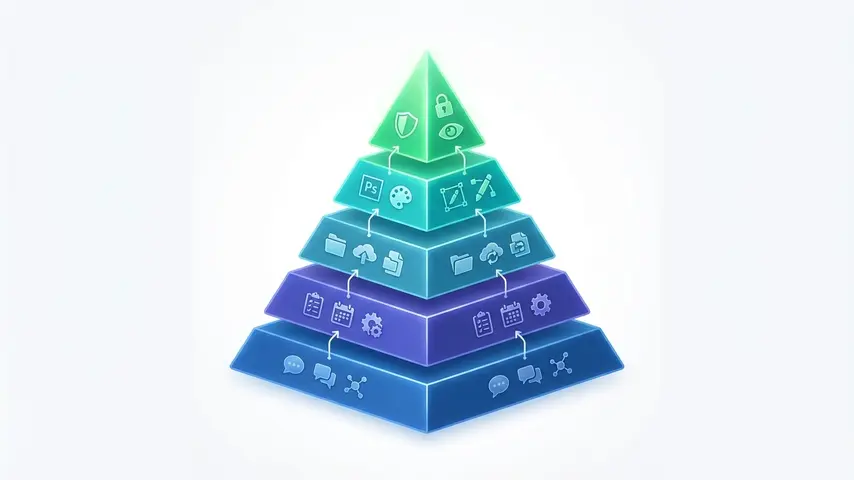
Here’s my honest framework for choosing remote working tools that actually stick:
- Start with 4–5 core tools maximum. Communication, project management, file storage, video calls, and one design tool. That’s it.
- Prioritize integration. Every tool you add should connect to your existing stack. If it doesn’t talk to Slack or your project manager, think twice.
- Test free plans first. Almost every tool listed here has a generous free tier. Use it for 2–4 weeks before committing money.
- Get team buy-in. The best tool in the world is useless if nobody on your team uses it. Choose tools that match your team’s comfort level, not just the reviewer’s recommendation.
- Audit quarterly. Every three months, ask: “Are we actually using this?” If not, cut it. Tool bloat is real and expensive.
Remote Work Isn’t Going Anywhere — Are You Set Up for It?
The shift to remote work isn’t a pandemic hangover. It’s a permanent restructuring of how millions of people work. Companies that embrace it attract better talent. Individuals who master it build more fulfilling careers with genuine flexibility.
But mastering remote work requires more than a laptop and WiFi. It requires the right systems, the right habits, and the right tools working together seamlessly.
If you’re exploring remote work seriously — whether you’re just starting out or looking to level up — understanding which roles thrive remotely is just as important as the tools you use. Our guide on the top 10 best jobs for remote work breaks down real opportunities worth pursuing, beyond the typical “become a freelancer” advice you see everywhere.
The tools are available. The opportunities are there. The only question is whether you’ll set yourself up properly to take advantage of both.
Frequently Asked Questions
What are the most essential remote work tools for beginners?
Start with four core tools: a messaging platform like Slack, a video conferencing tool like Zoom or Google Meet, a project management app like Notion or Trello, and cloud storage through Google Workspace or Dropbox. These cover 90% of what you need to work remotely without overwhelming you with options.
Are free remote work tools good enough for professional use?
For individuals and small teams, absolutely. Tools like Slack, Trello, Google Workspace, Canva, and Zoom all offer free plans that are genuinely functional. You’ll only need paid upgrades when your team grows or you hit specific feature limits like storage caps or participant limits on calls.
How many remote working tools should a team use?
Aim for 4 to 6 core tools that integrate well with each other. More than that creates context-switching overhead that kills productivity. The goal is consolidation, not collection. One communication tool, one project tracker, one file system, one video platform, and one or two specialty tools for your specific workflow.
What’s the biggest mistake people make when choosing remote work tools?
Adopting too many tools too quickly without evaluating whether they integrate with each other or match the team’s actual workflow. A tool that looks great in a review can become shelfware if it doesn’t fit how your team naturally operates. Always test with free plans before committing.
Do remote workers need a VPN?
If you ever work outside your home network — coffee shops, coworking spaces, hotels, airports — a VPN is essential. It encrypts your internet connection and protects sensitive company data from being intercepted on public WiFi. Even at home, a VPN adds a valuable layer of security and privacy.
How often should I review and update my remote tool stack?
Quarterly reviews work best. Every three months, evaluate which tools your team actually uses versus which ones just sit there costing money. Remove what’s unused, consolidate where possible, and assess whether any new tools could replace multiple existing ones for a simpler, more efficient workflow.
Remote work rewards those who approach it with intention. Pick your tools deliberately, keep your stack lean, and invest your energy in the work itself — not in managing the tools around it. That’s how you turn remote work from a daily struggle into a genuine competitive advantage.