You log into your bank. Your email. Your work systems. Your crypto exchange. Every one of these accounts represents something valuable — and every one of them is a target.
A password alone stopped being enough years ago. Data breaches expose millions of credentials monthly. Password reuse turns one leaked database into dozens of compromised accounts. The solution that security professionals have standardized on isn’t complicated. It’s a TOTP application — and if you don’t have one installed right now, this guide will help you choose the right one.
This review covers what makes a TOTP app genuinely good, compares the leading options across security, usability, and backup features, and gives you a clear recommendation based on your specific situation.
What Is a TOTP Application and Why Do You Need One?
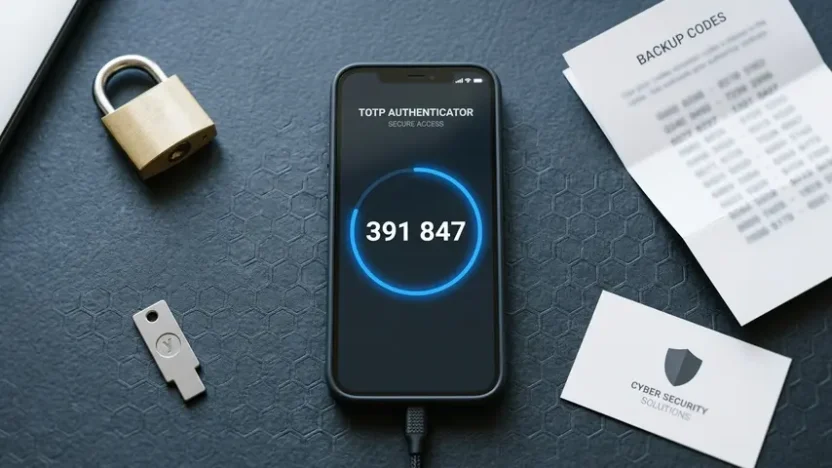
A TOTP application generates time-based one-time passwords — six-digit codes that change every 30 seconds and expire immediately after use. When you enable two-factor authentication on any service, the TOTP app acts as your second layer of verification beyond your password.
If you want to understand the cryptographic mechanism behind how these codes are generated and verified, our complete guide on how TOTP works explains the full technical process. For now, the practical point is this: even if someone knows your password, they cannot log into your account without the current code from your specific TOTP app on your specific device.
That time-limited, device-bound nature is what makes TOTP so effective. Phishing pages, credential-stuffing attacks, and brute-force attempts all fail against properly implemented two-factor authentication.
What Separates a Good TOTP App from a Bad One?
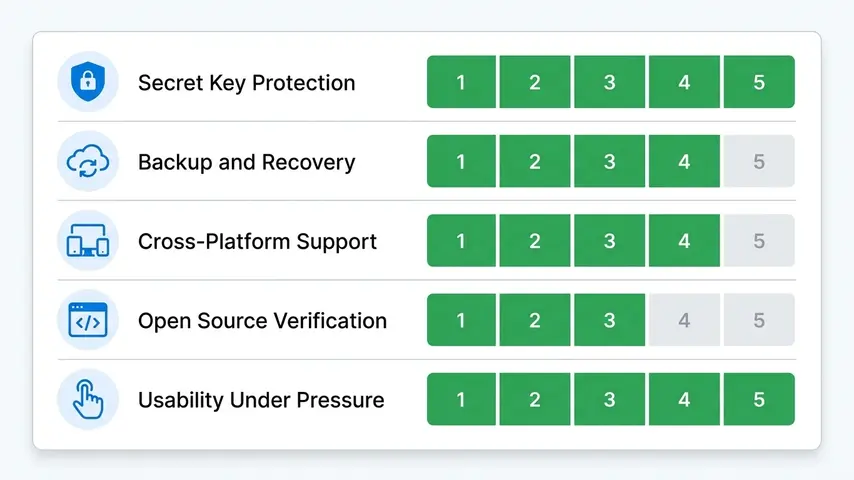
Not every TOTP authenticator is created equal. Before we review specific apps, here’s what the evaluation criteria look like for anyone serious about security.
Secret Key Protection
Your TOTP app stores secret keys that generate your codes. These need AES-256 encryption at rest and strict access controls. The best apps require biometric authentication — fingerprint or face recognition — before showing any codes. If someone picks up your phone, they shouldn’t be able to open your authenticator and see your accounts.
Backup and Recovery Architecture
The most common complaint from users switching phones: “I lost all my 2FA codes.” This happens when apps store secrets only locally without any backup mechanism. Quality TOTP applications provide encrypted cloud backup — protecting you from device loss without creating security vulnerabilities. The encryption should be end-to-end, meaning not even the app company can access your secrets.
Cross-Platform Availability
Your phone gets replaced. You might use iOS today and Android next year. Some users want codes accessible on desktop or tablet. Cross-platform support with synchronized accounts eliminates the pain of reconfiguring 2FA on every service during device transitions.
Open Source Verification
The gold standard for security software is public code. When an app’s source code is openly available for review, independent security researchers can verify there are no backdoors, unexpected data collection, or implementation vulnerabilities. Closed-source apps require trust in the company’s claims about their security practices.
Usability Under Pressure
You’re often entering TOTP codes quickly — before a 30-second window expires. The interface needs to surface the right account fast, display codes clearly, and copy them with minimal taps. A technically secure app that frustrates users into disabling 2FA entirely defeats the purpose.
The Best TOTP Applications Reviewed
1. Aegis Authenticator — Best for Android Users Who Want Full Control
Aegis is the TOTP app that security-conscious Android users consistently recommend. It’s fully open source, independently audited, locally encrypted, and completely free. No accounts required. No telemetry. No cloud services unless you explicitly configure your own backup destination.
The vault uses AES-256-GCM encryption with a password or biometric unlock. You can export your entire vault as an encrypted file and store it wherever you trust — a USB drive, your own cloud storage, or printed on paper. This level of control over your security data is rare among consumer apps.
✅ Strengths
- Fully open source
- AES-256 local encryption
- No cloud dependency
- Encrypted manual export
- Clean Material Design UI
- Completely free
❌ Limitations
- Android only
- No automatic cloud sync
- Manual backup management
- No desktop app
Best for: Android users, privacy advocates, open source supporters, anyone who wants maximum control over their authentication data.
2. Authy — Best Cross-Platform TOTP Authenticator
Authy solves the problem most users actually face: what happens when you get a new phone? With Authy, the answer is simple — your codes are already there when you sign in on the new device.
The multi-device sync uses AES-256 encryption with a backup password that only you know. Authy never has access to your decrypted secrets. The app runs on iOS, Android, Windows, Mac, and as a Chrome extension — covering virtually every platform combination.
✅ Strengths
- True multi-device sync
- Encrypted cloud backup
- Cross-platform (iOS, Android, desktop)
- Biometric protection
- Completely free
- Clean modern interface
❌ Limitations
- No manual secret export
- Closed source
- Requires phone number registration
- Ecosystem lock-in
Best for: Most users — anyone who values convenience alongside security and uses multiple devices.
⭐ Editor’s Choice: Authy is our recommended TOTP authenticator for the majority of users who want security without sacrificing convenience.
3. Google Authenticator — The Simple Standard
Google Authenticator defined what most people think of when they picture a TOTP application. It’s the app that most setup guides show QR codes for. It works reliably, supports every TOTP-compatible service, and requires no account beyond your existing Google account for optional sync.
Google added cloud backup in 2023, finally addressing the biggest historical criticism. That said, the backup isn’t as configurable as Authy’s, and the overall feature set remains minimal compared to competitors.
✅ Strengths
- Extremely simple UI
- No learning curve
- Now includes Google account backup
- Available on iOS and Android
- Free
❌ Limitations
- Backup requires Google account
- No multi-device sync control
- Minimal security features
- No biometric app lock (historically limited)
Best for: Users who want absolute simplicity and are already in Google’s ecosystem.
4. Microsoft Authenticator — Best for Microsoft Ecosystem
Microsoft Authenticator goes beyond TOTP to support passwordless sign-in for Microsoft accounts. You approve a push notification on your phone instead of typing a password and code. For heavy Microsoft 365, Azure, or Outlook users, this integration is genuinely useful.
The app also handles standard TOTP codes for non-Microsoft services, making it a complete solution for users already within the Microsoft ecosystem.
✅ Strengths
- Passwordless Microsoft login
- Works for any TOTP service
- Encrypted cloud backup
- Password autofill feature
- Free
❌ Limitations
- Backup tied to Microsoft account
- Interface can feel cluttered
- Best value only within Microsoft ecosystem
Best for: Microsoft 365 users, enterprise users on Azure AD, anyone who frequently signs into Microsoft services.
5. Bitwarden Authenticator — Best for Open Source + Password Manager Integration
Bitwarden split its TOTP feature into a dedicated standalone app (Bitwarden Authenticator) separate from its password manager. This is a significant choice — it means your passwords and 2FA codes live in separate apps by default, which many security professionals prefer for defense-in-depth.
The app is fully open source, works offline, and provides encrypted local vault storage. It’s a newer entry compared to Authy or Google Authenticator, but its open source pedigree and Bitwarden’s reputation for transparent security practices make it worth considering.
✅ Strengths
- Fully open source
- Separated from password manager
- Encrypted local storage
- iOS and Android
- Free
❌ Limitations
- Newer app, smaller community
- Limited backup options vs. Authy
- No desktop app yet
Best for: Bitwarden password manager users, open source advocates who want iOS support (Aegis is Android-only).
6. Raivo OTP — Best for iOS Privacy-Focused Users
Raivo fills the gap that Aegis leaves on iOS. It’s open source, iCloud-backed (encrypted), and specifically designed for the Apple ecosystem. The interface is clean and distinctly iOS-native, feeling right at home alongside Apple’s own apps.
✅ Strengths
- Open source
- Encrypted iCloud backup
- Native iOS design
- Apple Watch support
- Free
❌ Limitations
- iOS only
- iCloud dependency for backup
- No Android version
Best for: Privacy-focused iPhone users who want an open source alternative to Google Authenticator.
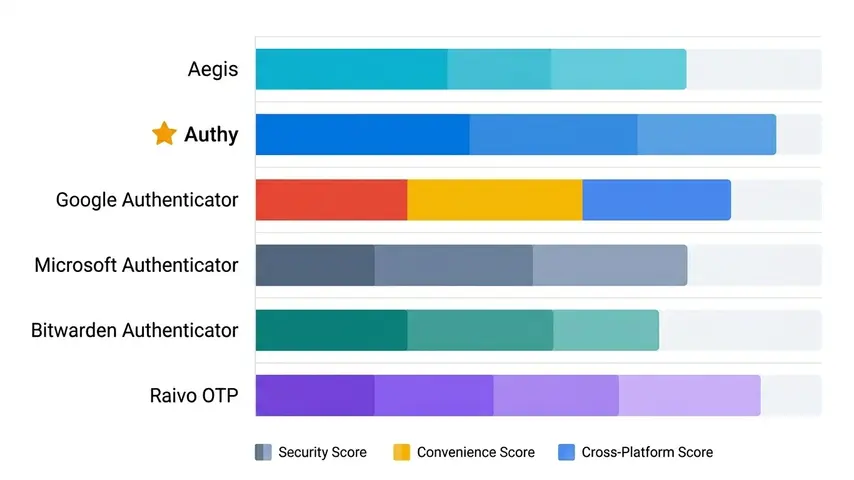
Side-by-Side Comparison: All Six TOTP Apps
| TOTP App | Platform | Open Source | Cloud Backup | Price | Best For |
|---|---|---|---|---|---|
| Aegis | Android | ✅ | Manual | Free | Privacy/control |
| Authy ⭐ | iOS/Android/Desktop | ❌ | ✅ Encrypted | Free | Most users |
| Google Authenticator | iOS/Android | ❌ | Free | Simplicity | |
| Microsoft Authenticator | iOS/Android | ❌ | ✅ Microsoft | Free | Microsoft users |
| Bitwarden Authenticator | iOS/Android | ✅ | Limited | Free | Open source iOS |
| Raivo OTP | iOS only | ✅ | ✅ iCloud | Free | iOS privacy users |
Choosing the Right TOTP Application for Your Situation
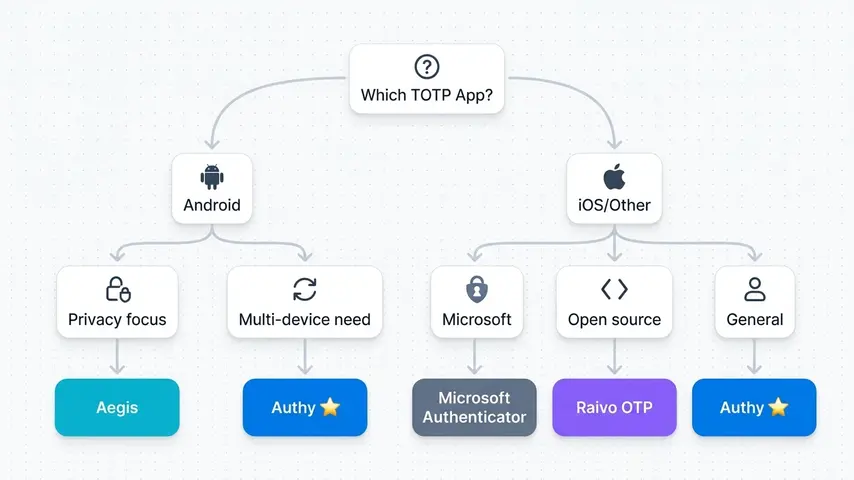
The “best” TOTP application isn’t universal — it depends on what you value and how you use your devices. Here’s the decision tree that leads most users to the right choice.
If You Use Android and Prioritize Privacy
Choose Aegis. No other app matches its combination of open source transparency, strong local encryption, and complete independence from any cloud service.
If You Use Multiple Devices or Switch Phones Regularly
Choose Authy. The multi-device sync removes the pain of device transitions without compromising encryption quality. It’s the pragmatic choice for most people.
If You’re Deep in the Microsoft Ecosystem
Choose Microsoft Authenticator. The passwordless sign-in feature alone is worth it for heavy Microsoft users, and having your backup tied to your existing Microsoft account simplifies recovery.
If You Use iPhone and Care About Open Source
Choose Raivo OTP. It fills the iOS gap that Aegis leaves, with open source code, encrypted iCloud backup, and native Apple design.
If You Already Use Bitwarden for Passwords
Consider Bitwarden Authenticator — but understand that keeping it separate from your Bitwarden password vault maintains better defense-in-depth than combining both in one app.
Setting Up Your TOTP Application: What to Expect
Every TOTP authenticator follows the same basic setup flow across all services:
- Go to the security or two-factor authentication settings on the service you want to protect
- Select “authenticator app” as your 2FA method
- The service displays a QR code containing your secret key
- Open your TOTP app and scan the QR code
- Your app immediately begins generating codes for that account
- Enter the current 6-digit code to verify the setup worked
- Save the backup codes provided by the service in a secure location
If you’re building an application that uses TOTP and want to verify your implementation produces correct codes, a free TOTP code generator lets you test against known secrets without setting up a full test account in an authenticator app.
For a deeper comparison of authenticator apps with more detail on features like push notifications and enterprise options, our full authenticator app review covers six apps including Duo Mobile and 1Password integration.
Critical Security Habits Alongside Your TOTP App
Installing a TOTP application is only the first step. These habits ensure your 2FA setup actually protects you:
Save backup codes during setup. Every service provides one-time recovery codes when you enable 2FA. Store them somewhere secure and separate from your phone — not in your notes app, not in an email draft, not in a folder called “passwords.” A physical printout in a secure location is a legitimate option.
Enable app lock on your TOTP authenticator. Require biometric authentication to open the app itself. If your phone is unlocked but your authenticator requires a fingerprint, a thief who swipes your phone can’t trivially access your codes.
Enable 2FA on your most valuable accounts first. Primary email, banking, and any account containing financial information should be protected before social media and less critical services. Your primary email is the master key — every other account can be reset through it.
Test your backup before you need it. Before your device breaks or gets lost, verify that your backup codes work and that you can restore your TOTP app from backup. Discovering your backup is corrupt during an actual emergency is not the learning experience you want.
Frequently Asked Questions
What is a TOTP application?
A TOTP application is software that generates Time-based One-Time Passwords — six-digit codes that change every 30 seconds and are used as the second factor in two-factor authentication. The app stores secret keys shared with the services you use, and calculates codes using those keys combined with the current timestamp. Both the app and the service independently calculate the same code, allowing verification without transmitting sensitive data.
Are all TOTP apps compatible with each other?
Yes. All TOTP applications implement the same open standard (RFC 6238), so they generate identical codes for the same secret key at the same moment. You can use any TOTP app with any service that supports authenticator-based 2FA. You can even use multiple different TOTP apps simultaneously for the same account — they’ll all produce the same code. This interoperability is by design and one of TOTP’s major strengths over proprietary authentication solutions.
What happens to my TOTP codes if I lose my phone?
It depends on your TOTP app. Apps with encrypted cloud backup (Authy, Microsoft Authenticator, Google Authenticator with sync enabled) restore your codes on a new device after authentication. Apps without cloud sync (Aegis without manual backup) result in code loss — you’d need to use backup codes or account recovery options to regain access to each service individually. This is why saving the one-time backup codes provided during 2FA setup is critical regardless of which TOTP app you use.
Is a TOTP authenticator safer than SMS verification?
Yes, significantly. SMS codes can be intercepted through SIM swapping attacks, SS7 protocol vulnerabilities, and phishing. They also require cellular connectivity and expire slowly (often minutes). TOTP codes are generated locally on your device without network transmission, expire in 30 seconds, and are immune to SIM swapping attacks since they don’t involve your phone number. Security guidelines from NIST and most security researchers recommend TOTP over SMS for two-factor authentication.
Can I use a TOTP app on multiple devices?
Yes, depending on the app. Authy explicitly supports multiple devices simultaneously — install it on your phone, tablet, and desktop and all show the same codes. Other apps like Google Authenticator sync through your cloud account, letting you access codes after signing in on a new device. Some apps like Aegis are single-device only, requiring manual export and import to use on multiple devices. Check the specific app’s documentation before assuming multi-device capability.
Do TOTP apps work without internet?
Yes, every TOTP application generates codes completely offline. The algorithm only needs the stored secret key and your device’s clock — no internet connection, no cellular service, and no server communication during code generation. This is one of TOTP’s significant advantages over push-notification 2FA methods that require connectivity. Your codes work on planes, in areas with no signal, and during network outages as long as your device’s time is reasonably accurate.
The Final Recommendation
There’s no single TOTP application that wins for everyone. The right choice depends on your platform, privacy priorities, and how much you value convenience versus control.
For most people reading this guide, Authy is the answer. It’s free, secure, works across every platform, and solves the “I got a new phone” problem that causes most users to abandon 2FA entirely. That’s the app we’d hand to a non-technical friend and feel confident they’d stay protected.
For Android users with strong privacy preferences, Aegis is the answer. For iOS users who want open source transparency, Raivo OTP fills that role.
If you’re unsure which category you fall into, start with Authy. You can always migrate later once you’ve developed a clearer sense of your security preferences and workflow.
What matters most isn’t which specific TOTP app you choose. What matters is that you choose one and actually use it. Every account you protect with TOTP today is an account that password leaks, phishing attacks, and credential stuffing can’t touch tomorrow.