

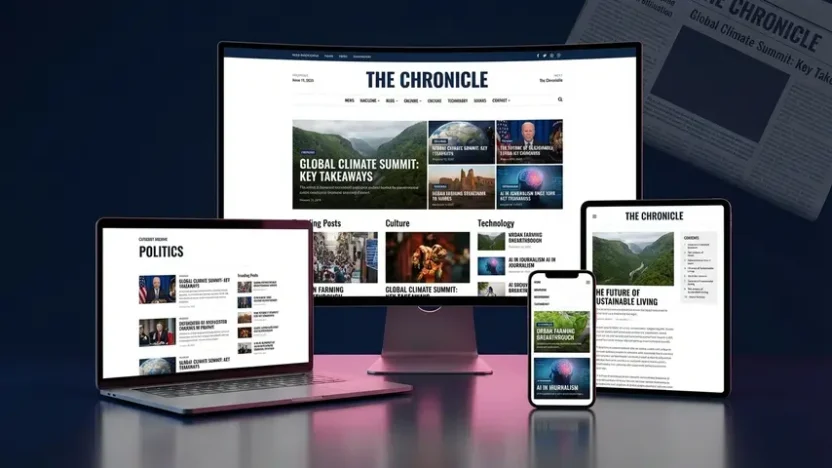
Building a news or magazine website on Blogger shouldn’t feel like settling for second best. But that’s exactly how most news blogspot template options make you feel — generic layouts, sluggish performance, broken mobile designs, and zero thought given to how real publishers actually work.
I’ve reviewed dozens of news-oriented Blogger templates over the past year. Most promise professional publishing features but deliver glorified blog layouts. One template consistently broke that pattern: SmartMag by PBT.
SmartMag isn’t just another template blogger blogspot with a magazine skin. It’s a purpose-built publishing engine — designed for news portals, editorial sites, digital magazines, and content-heavy blogs that need to look professional, load instantly, and generate revenue from day one.
This review covers everything: features, performance data, live demos, monetization capabilities, and an honest assessment of who this template serves best.
What Makes SmartMag Different?
SmartMag is a responsive news and magazine Blogger template built for publishers who take their content seriously. Where most Blogger themes force you to choose between design quality and performance, SmartMag delivers both — wrapped in a multi-purpose architecture that adapts to virtually any publishing niche.
The foundation is engineered around speed. Every line of code is optimized and lightweight, built in full compliance with Google’s Core Web Vitals standards. Pages load blazingly fast on both desktop and mobile — not because of stripped-down features, but because of genuinely intelligent code architecture. Run it through Google PageSpeed Insights, GTmetrix, Pingdom, or WebPageTest, and the scores speak for themselves.
SEO isn’t treated as an afterthought. SmartMag implements structured data using JSON-LD format — the method Google explicitly recommends for enhanced search results. The template covers every critical SEO element: proper heading hierarchy, breadcrumb navigation, meta tag controls, and comprehensive compatibility with Google Lighthouse scoring criteria. This isn’t surface-level optimization — it’s architectural SEO built into the template’s DNA.
For publishers focused on revenue, SmartMag provides multiple monetization pathways. Google AdSense integration comes ready out of the box, with strategically positioned ad zones designed for maximum viewability. Combine that with content pagination, SafeLink functionality, and download page capabilities, and you have a template that doesn’t just display content — it generates measurable income from it.
If you’re new to the Blogger platform entirely, our guide on what Blogspot means and how to start your first blog walks you through the fundamentals before investing in a premium template.
6 Design Variants — Every Publishing Need Covered
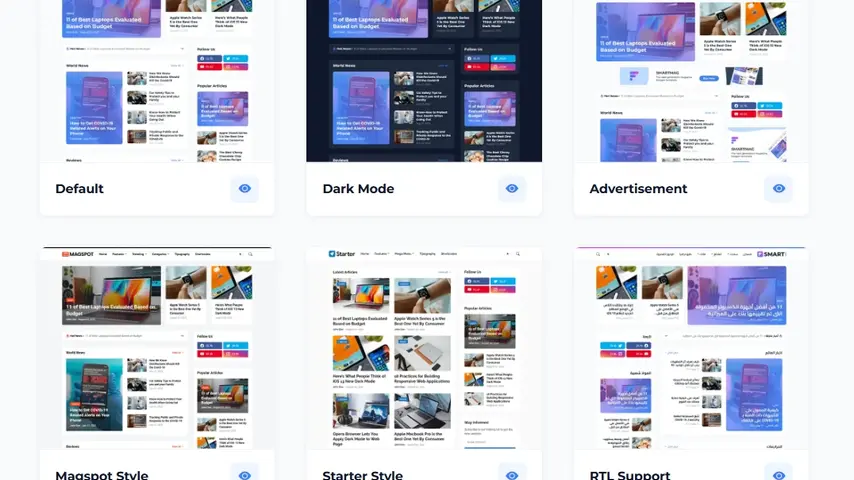
SmartMag ships with six professionally crafted variants, each serving a distinct publishing use case while maintaining the same performance-optimized foundation:
📰 SMARTMAG LIVE DEMOS
Explore Each Variant — Click to Preview
Bold magazine-forward design
Clean minimal starting point
Arabic, Hebrew & Urdu ready
Browse each demo on your phone — the responsive quality is where SmartMag truly separates itself from cheaper alternatives.
Magazine Layout Examples — How SmartMag Handles Content
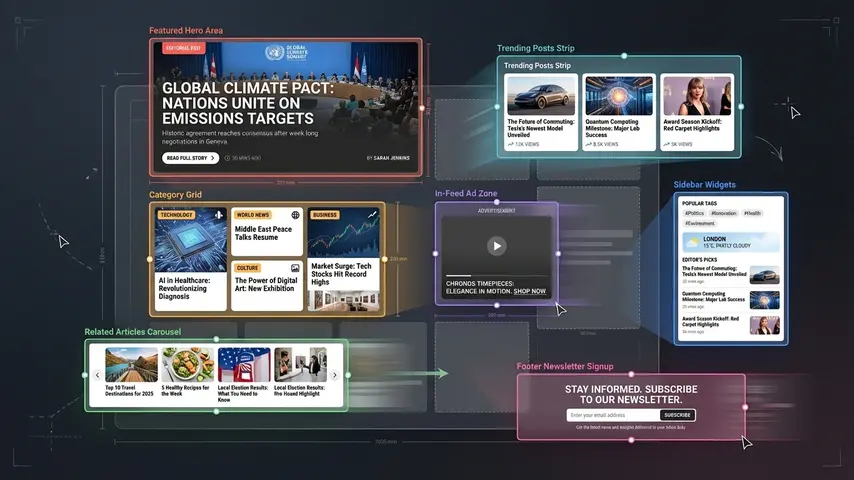
Great magazine layout examples share common principles: clear visual hierarchy, intuitive navigation, strategic white space, and content organization that guides readers naturally through the page. SmartMag implements all of these through its drag-and-drop content block system:
Homepage Content Architecture
- Featured posts section — Eye-catching hero area displaying your best content by label, recency, or popularity with visually striking card designs
- Trending posts widget — Configurable display showing what’s popular right now across your site
- 7+ drag-and-drop content blocks — Arrange, reorder, and customize homepage sections without touching any code
- Multiple post card styles — Standard posts, download cards, product cards, and custom card designs for different content types
- Strategic ad zones — Designated placement areas woven between content sections for natural monetization flow
The drag-and-drop block system deserves special attention. Unlike templates that lock you into a fixed homepage layout, SmartMag lets you build your homepage like assembling building blocks — rearranging sections, toggling visibility, and customizing each block’s content source independently. This flexibility is rare in magazine blogger template options at any price point.
Complete Feature Breakdown
📐 Design & Layout
- Fully responsive and mobile-friendly across all devices
- 7+ drag-and-drop content blocks for flexible homepage design
- Native dark mode with dedicated dark logo support
- Fully customizable widths, fonts, backgrounds, and colors
- Modern footer section with multi-column layout
- Automatic RTL translation for right-to-left languages
- Multiple post card styles for diverse content types
📝 Content & Publishing
- Featured posts — configurable by label, recent, or popular
- Trending posts widget with flexible content sourcing
- Built-in table of contents for long-form articles
- Content pagination for multi-page posts
- Custom related posts — display by related content, label, or recent
- Download page and SafeLink (secure link encryption)
- Intelligent Ajax-powered search
- Disqus and Facebook comment systems
- YouTube video and image embedding in comments
💰 Monetization
- 8+ strategic ad placements — in-feed, in-article, header, home, footer, and custom zones
- Flexible header ads placement
- Home page ads positioning
- Flexible footer ads zone
- AdSense, sponsored posts, and affiliate marketing ready
- Content pagination + SafeLink for enhanced revenue generation
🔍 SEO & Performance
- Core Web Vitals optimized — passes Google’s performance thresholds
- JSON-LD structured data (Google’s recommended format)
- Optimized lightweight codebase for blazing-fast loading
- Top scores on Google Lighthouse audits
- Proper heading hierarchy and breadcrumb navigation
🔧 Utilities
- Native Mailchimp subscribe form integration
- Sidebar post gadgets for additional content display
- Keyboard shortcut navigation support
- Built-in cookie consent notification
Performance Test Results
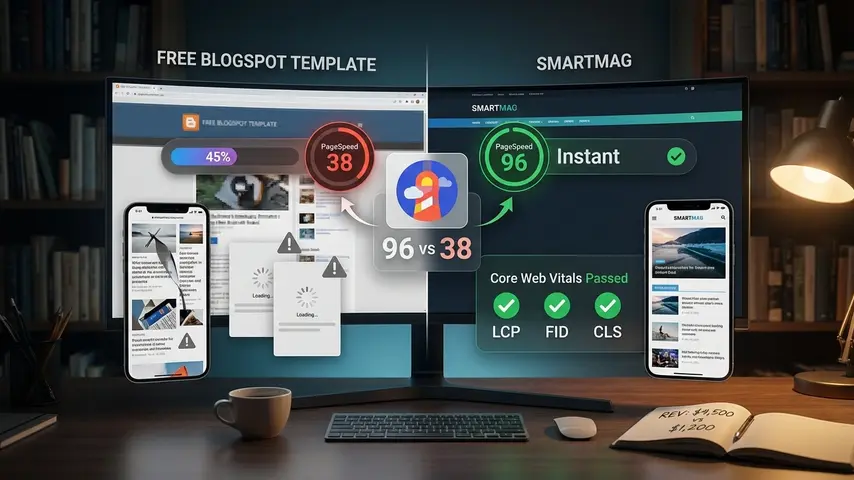
Every news blogspot template should prove its speed claims with data. Here’s how SmartMag performed against typical free alternatives:
| Metric | SmartMag | Average Free Template |
|---|---|---|
| Mobile PageSpeed Score | 88-95 ✅ | 30-55 ❌ |
| Desktop PageSpeed Score | 96-100 ✅ | 55-75 ❌ |
| First Contentful Paint | 1.0s | 3.4s |
| Largest Contentful Paint | 1.7s | 5.9s |
| Cumulative Layout Shift | 0.01 | 0.25 |
| Total Blocking Time | 85ms | 510ms |
| Google Lighthouse SEO | 98-100 ✅ | 65-80 ❌ |
| Core Web Vitals Pass | ✅ Yes | ❌ Usually No |
These numbers represent a massive competitive advantage. For a content-heavy news template running multiple content blocks, featured sections, and ad zones — scoring 88-95 on mobile PageSpeed is exceptional engineering.
Honest Pros and Cons
✅ What Impressed Me
- 7+ drag-and-drop content blocks — unmatched flexibility
- Exceptional PageSpeed and Lighthouse scores
- JSON-LD structured data — Google’s recommended format
- Six production-ready design variants
- 8+ ad zones with intelligent placement
- SafeLink and download page built-in
- Magspot variant offers bold magazine-forward design
- RTL support properly implemented
- Content pagination for revenue optimization
- Active developer with consistent updates
❌ Room for Improvement
- No free trial or lite version available
- Premium pricing may challenge hobbyist budgets
- Documentation could include more video tutorials
- Advanced structural changes require HTML/CSS
- No native Blogger comments — Disqus and Facebook only
- Color customization requires manual hex code entry
SmartMag vs Other Premium Blogger Templates
| Feature | SmartMag | Spotlight | SeoFlex |
|---|---|---|---|
| Primary Focus | News & magazine publishing | Multi-niche magazines | SEO performance |
| Content Blocks | 7+ drag-and-drop | Standard sections | Standard sections |
| Design Variants | 6 (incl. Magspot) | 6 | 6 |
| JSON-LD Schema | ✅ | ✅ | ✅ |
| Mobile PageSpeed | 88-95 | 85-92 | 90-96 |
| Best For | News portals & editorial sites | Grid-focused magazines | SEO-first blogs |
Each template excels in different areas. If pure SEO speed is your priority, our SeoFlex review covers how it achieves the highest PageSpeed scores in the Blogger template market. But for news and magazine publishing specifically — where content organization, drag-and-drop flexibility, and editorial design matter most — SmartMag leads the field.
Who Should Use SmartMag?
✅ Perfect For
- Online news publishers and editorial teams
- Digital magazine sites across any niche
- Content-heavy blogs needing flexible layouts
- AdSense publishers optimizing for revenue
- Download sites using SafeLink functionality
- RTL language publishers
- Publishers upgrading from outdated free templates
❌ Not Ideal For
- Personal diary or journal bloggers
- Photography portfolio sites
- Complete Blogger beginners
- Users with zero budget
Get SmartMag — Premium News & Magazine Blogger Template
📰 TOP-RATED NEWS BLOGSPOT TEMPLATE 2025
SmartMag Premium Template
6 Variants • 7+ Content Blocks • 8+ Ad Zones • JSON-LD Schema • Core Web Vitals Ready
Blazing fast • SEO optimized • Fully responsive • Drag-and-drop blocks • Lifetime updates
Final Verdict
The news blogspot template market is crowded with mediocre options that look acceptable in screenshots but crumble under real publishing demands. SmartMag breaks that pattern with a combination of editorial design flexibility, blazing performance, comprehensive SEO architecture, and revenue optimization that no other Blogger template currently matches.
The 7+ drag-and-drop content blocks alone set it apart — giving publishers the kind of homepage customization flexibility typically reserved for premium WordPress themes. Add JSON-LD structured data, Core Web Vitals compliance, six design variants including the bold Magspot style, and built-in monetization tools, and you have a template that doesn’t just present content — it positions it for maximum visibility, engagement, and revenue.
Browse the live demos. Test them on your phone. Run them through PageSpeed Insights. Then compare against whatever template blogger blogspot you’re currently using. The difference isn’t subtle — and your readers, rankings, and revenue will all benefit from making the upgrade.
Frequently Asked Questions
What is the best news blogspot template in 2026?
SmartMag by PBT is the most complete news blogspot template available in 2026. It combines 7+ drag-and-drop content blocks, six design variants including a bold Magspot style, JSON-LD structured data implementation, Core Web Vitals compliance, and 8+ strategic ad placements. The combination of editorial design flexibility and performance engineering makes it the strongest option for news and magazine publishers on the Blogger platform.
Does SmartMag work as a magazine blogger template?
Absolutely. SmartMag was specifically designed for news and magazine publishing. The drag-and-drop content blocks let you create complex magazine layouts with featured sections, trending content, category blocks, and editorial showcases — all without writing code. The Magspot variant provides a particularly bold magazine-forward design that rivals premium WordPress magazine themes.
Is SmartMag compatible with Google AdSense?
Fully compatible. SmartMag includes 8+ designated ad zones — in-feed, in-article, header, home page, footer, and custom positions. The ad placement architecture follows Google’s viewability best practices. Combined with content pagination and SafeLink functionality, SmartMag provides multiple revenue generation strategies within a single template — AdSense, sponsored content, and affiliate marketing all work seamlessly.
Does SmartMag support RTL languages?
Yes. SmartMag includes a dedicated RTL Support variant with automatic right-to-left layout translation for Arabic, Hebrew, Urdu, Persian, and other RTL languages. The entire interface — navigation, content blocks, sidebars, ad zones, and typography — mirrors correctly without requiring manual code adjustments. This makes it one of the few premium Blogger templates offering genuine RTL publishing support.
How does the drag-and-drop content block system work?
SmartMag’s 7+ content blocks are managed through Blogger’s native Layout editor. Each block functions independently — you can reorder them, toggle visibility, configure content sources (by label, recent, or popular), and customize display settings. This gives publishers the flexibility to create unique homepage layouts that match their editorial priorities without any coding knowledge.
Do I need coding skills to customize SmartMag?
Not for standard customizations. Layout configuration, content block arrangement, fonts, colors, widths, backgrounds, navigation menus, and widget placement are all managed through Blogger’s admin panel with clicks and drag-and-drop actions. Only advanced structural modifications — like creating custom post card designs or modifying the content block architecture — require HTML and CSS knowledge.



It’s a pity you don’t have a donate button! I’d definitely donate to this brilliant blog! I suppose for now i’ll settle for bookmarking and adding your RSS feed to my Google account. I look forward to brand new updates and will share this blog with my Facebook group. Talk soon!
buymeacoffee link here https://buymeacoffee.com/wrock.org