


You need to transfer a file from one server to another. Or download a file from a remote URL directly to your hosting without saving it locally first. Or build a tool that lets users paste a link and have the file uploaded to your server automatically. The solution in every case is a remote file upload PHP script.
The problem? Most scripts you find online are either dangerously insecure, hopelessly outdated, or so poorly written that they break the moment you deploy them on a real server. I’ve seen “tutorial” scripts with zero input validation, no file type restrictions, and wide-open security holes that practically invite attackers to upload malicious files.
This guide takes a different approach. We’ll build a fully functional remote uploader from scratch — one that actually works in production, handles errors gracefully, and doesn’t leave your server exposed. Every line of code is explained, every security consideration is addressed.
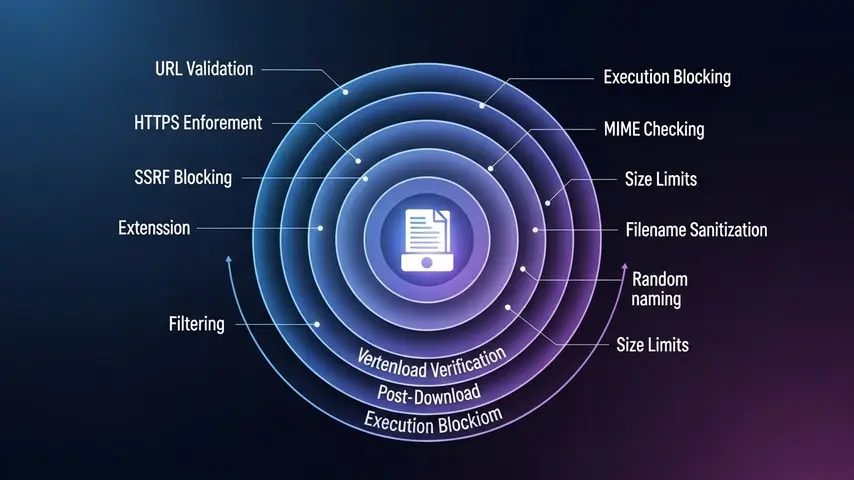
What Is a Remote File Upload PHP Script?
A remote upload PHP script fetches a file from an external URL and saves it directly to your server. Instead of downloading a file to your computer and then re-uploading it to your hosting, the script handles the entire transfer server-side — your server talks directly to the source server.
Common use cases include:
- Media aggregation — Pulling images, videos, or documents from external sources into your application
- File mirroring — Creating backup copies of files hosted elsewhere
- User-facing upload tools — Letting users paste a URL instead of manually downloading and re-uploading files
- Server-to-server transfers — Moving files between hosting environments without local intermediary steps
- API integrations — Fetching assets from third-party services programmatically
Before You Build — Security First
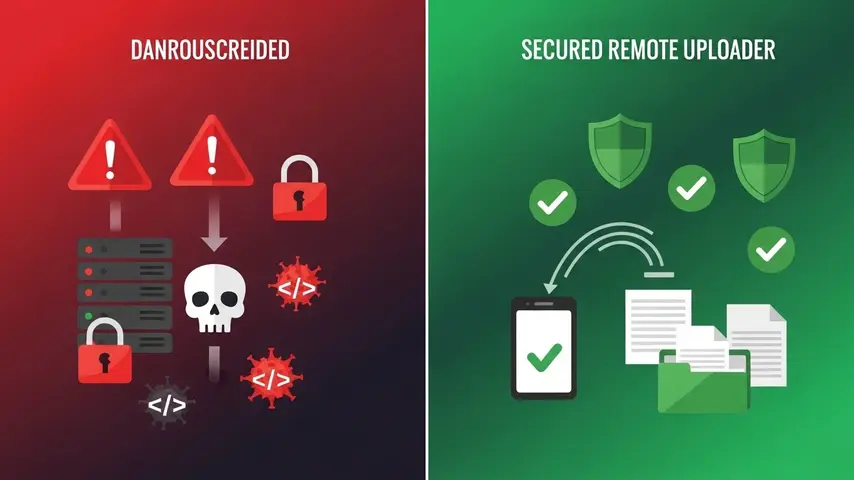
Let’s address the elephant in the room before writing a single line of code. A remote URL upload PHP script without proper security is essentially an open door for attackers. Here’s what can go wrong:
- Malicious file uploads — An attacker submits a URL pointing to a PHP shell or executable, which your script downloads and stores on your server. If the upload directory is web-accessible, they can execute it remotely
- Server-Side Request Forgery (SSRF) — Your script can be tricked into fetching internal network resources, exposing sensitive server data
- Disk space exhaustion — Without file size limits, someone submits a URL to a 50GB file and fills your server’s storage
- Directory traversal — Manipulated filenames could write files outside the intended upload directory
Every security measure in the script below directly addresses these attack vectors. Don’t skip them. Don’t simplify them. Your server’s integrity depends on it.
If you’re managing your own server, proper SSH access configuration is equally critical. Our guide on PuTTY download and SSH keys setup for maximum security covers how to secure your server access layer — which complements the file upload security we’re building here.
Step 1: Set Up the Project Structure
Create a clean directory structure on your server:
remote-uploader/
├── index.php          # Frontend form
├── upload.php         # Backend processing script
├── uploads/           # Storage directory (restricted)
└── .htaccess          # Security rules for uploads folder
First, secure the uploads directory by creating a .htaccess file inside the uploads/ folder:
# uploads/.htaccess
# Prevent direct execution of any uploaded files
Options -Indexes -ExecCGI
RemoveHandler .php .phtml .php3 .php4 .php5 .php7 .phps
RemoveType .php .phtml .php3 .php4 .php5 .php7 .phps

# Block all script execution
<FilesMatch "\.(php|phtml|php3|php4|php5|php7|phps|cgi|pl|py|sh|bash)$">
    Require all denied
</FilesMatch>
This ensures that even if a malicious file somehow gets uploaded, it cannot be executed through the web server.
Step 2: Build the Frontend Form
Create a clean, simple form where users paste the remote file URL:
<!-- index.php -->
<!DOCTYPE html>
<html lang="en">
<head>
    <meta charset="UTF-8">
    <meta name="viewport" content="width=device-width, initial-scale=1.0">
    <title>Remote File Uploader</title>
    <style>
        * { margin: 0; padding: 0; box-sizing: border-box; }
        body { font-family: -apple-system, sans-serif; background: #0f0f1a; color: #fff; display: flex; justify-content: center; align-items: center; min-height: 100vh; }
        .container { background: #1a1a2e; padding: 40px; border-radius: 14px; border: 1px solid #2d2d44; width: 100%; max-width: 520px; }
        h1 { font-size: 22px; margin-bottom: 8px; }
        p.sub { color: #888; font-size: 14px; margin-bottom: 24px; }
        input[type="url"] { width: 100%; padding: 14px 16px; background: #0f0f1a; border: 1px solid #2d2d44; border-radius: 8px; color: #fff; font-size: 15px; margin-bottom: 16px; }
        button { width: 100%; padding: 14px; background: #6c5ce7; color: #fff; border: none; border-radius: 8px; font-size: 16px; font-weight: 600; cursor: pointer; }
        button:hover { background: #5a4bd1; }
        .msg { margin-top: 16px; padding: 12px; border-radius: 8px; font-size: 14px; }
        .success { background: #0a3d2a; border: 1px solid #10b981; color: #10b981; }
        .error { background: #3d0a0a; border: 1px solid #ef4444; color: #ef4444; }
    </style>
</head>
<body>
    <div class="container">
        <h1>🔗 Remote File Uploader</h1>
        <p class="sub">Paste a direct file URL to upload it to this server</p>
        <form action="upload.php" method="POST">
            <input type="url" name="remote_url" placeholder="https://example.com/file.zip" required>
            <button type="submit">Upload File</button>
        </form>

        <?php if (isset($_GET['status'])): ?>
            <div class="msg <?php echo $_GET['status'] === 'success' ? 'success' : 'error'; ?>">
                <?php echo htmlspecialchars($_GET['message']); ?>
            </div>
        <?php endif; ?>
    </div>
</body>
</html>
Step 3: Build the Secure Backend Script
This is the core of the remote file upload PHP script — where security and functionality must work together perfectly:
<?php
// upload.php — Secure Remote File Upload Handler

// ============================================
// CONFIGURATION
// ============================================
$config = [
    'upload_dir'     => __DIR__ . '/uploads/',
    'max_file_size'  => 50 * 1024 * 1024, // 50MB limit
    'timeout'        => 30,                // cURL timeout in seconds
    'allowed_types'  => [
        'image/jpeg', 'image/png', 'image/gif', 'image/webp',
        'video/mp4', 'video/webm',
        'application/pdf',
        'application/zip', 'application/x-zip-compressed',
        'text/plain', 'text/csv'
    ],
    'allowed_extensions' => [
        'jpg', 'jpeg', 'png', 'gif', 'webp',
        'mp4', 'webm',
        'pdf', 'zip', 'txt', 'csv'
    ],
    'blocked_hosts' => [
        '127.0.0.1', 'localhost', '0.0.0.0',
        '10.', '172.16.', '192.168.', '169.254.'
    ]
];

// ============================================
// HELPER FUNCTIONS
// ============================================

function redirect($status, $message) {
    header('Location: index.php?status=' . $status . '&message=' . urlencode($message));
    exit;
}

function isBlockedHost($url, $blockedHosts) {
    $parsedUrl = parse_url($url);
    if (!$parsedUrl || !isset($parsedUrl['host'])) return true;

    $host = $parsedUrl['host'];
    $ip = gethostbyname($host);

    foreach ($blockedHosts as $blocked) {
        if (strpos($ip, $blocked) === 0 || $host === $blocked) {
            return true;
        }
    }
    return false;
}

function sanitizeFilename($filename) {
    $filename = basename($filename);
    $filename = preg_replace('/[^a-zA-Z0-9._-]/', '_', $filename);
    $filename = preg_replace('/_+/', '_', $filename);
    return substr($filename, 0, 100);
}

function getRemoteFileInfo($url, $timeout) {
    $ch = curl_init($url);
    curl_setopt_array($ch, [
        CURLOPT_NOBODY         => true,
        CURLOPT_RETURNTRANSFER => true,
        CURLOPT_FOLLOWLOCATION => true,
        CURLOPT_MAXREDIRS      => 3,
        CURLOPT_TIMEOUT        => $timeout,
        CURLOPT_SSL_VERIFYPEER => true,
        CURLOPT_USERAGENT      => 'RemoteUploader/1.0'
    ]);
    curl_exec($ch);

    $info = [
        'http_code'    => curl_getinfo($ch, CURLINFO_HTTP_CODE),
        'content_type' => curl_getinfo($ch, CURLINFO_CONTENT_TYPE),
        'file_size'    => curl_getinfo($ch, CURLINFO_CONTENT_LENGTH_DOWNLOAD)
    ];

    curl_close($ch);
    return $info;
}

// ============================================
// MAIN PROCESSING
// ============================================

// Verify request method
if ($_SERVER['REQUEST_METHOD'] !== 'POST') {
    redirect('error', 'Invalid request method.');
}

// Get and validate URL
$remoteUrl = filter_input(INPUT_POST, 'remote_url', FILTER_VALIDATE_URL);
if (!$remoteUrl) {
    redirect('error', 'Please enter a valid URL.');
}

// Enforce HTTPS only
if (parse_url($remoteUrl, PHP_URL_SCHEME) !== 'https') {
    redirect('error', 'Only HTTPS URLs are allowed for security.');
}

// Block internal/private network access (SSRF prevention)
if (isBlockedHost($remoteUrl, $config['blocked_hosts'])) {
    redirect('error', 'Access to internal network addresses is not allowed.');
}

// Get remote file metadata before downloading
$fileInfo = getRemoteFileInfo($remoteUrl, $config['timeout']);

if ($fileInfo['http_code'] !== 200) {
    redirect('error', 'Remote file not accessible. HTTP status: ' . $fileInfo['http_code']);
}

// Validate file size
if ($fileInfo['file_size'] > $config['max_file_size']) {
    redirect('error', 'File exceeds maximum allowed size of ' . ($config['max_file_size'] / 1024 / 1024) . 'MB.');
}

// Validate MIME type from headers
$contentType = explode(';', $fileInfo['content_type'])[0];
if (!in_array(trim($contentType), $config['allowed_types'])) {
    redirect('error', 'File type not allowed: ' . htmlspecialchars($contentType));
}

// Extract and validate file extension
$urlPath = parse_url($remoteUrl, PHP_URL_PATH);
$extension = strtolower(pathinfo($urlPath, PATHINFO_EXTENSION));
if (!in_array($extension, $config['allowed_extensions'])) {
    redirect('error', 'File extension not allowed: .' . htmlspecialchars($extension));
}

// Generate safe filename
$originalName = sanitizeFilename(pathinfo($urlPath, PATHINFO_BASENAME));
$uniqueName = time() . '_' . bin2hex(random_bytes(8)) . '.' . $extension;

// Ensure upload directory exists
if (!is_dir($config['upload_dir'])) {
    mkdir($config['upload_dir'], 0750, true);
}

$destination = $config['upload_dir'] . $uniqueName;

// Download the file
$ch = curl_init($remoteUrl);
$fp = fopen($destination, 'w+');

if (!$fp) {
    redirect('error', 'Failed to create local file. Check directory permissions.');
}

curl_setopt_array($ch, [
    CURLOPT_FILE           => $fp,
    CURLOPT_FOLLOWLOCATION => true,
    CURLOPT_MAXREDIRS      => 3,
    CURLOPT_TIMEOUT        => $config['timeout'],
    CURLOPT_SSL_VERIFYPEER => true,
    CURLOPT_USERAGENT      => 'RemoteUploader/1.0'
]);

$success = curl_exec($ch);
$curlError = curl_error($ch);
curl_close($ch);
fclose($fp);

// Handle download failure
if (!$success) {
    @unlink($destination);
    redirect('error', 'Download failed: ' . htmlspecialchars($curlError));
}

// Final validation — verify actual file MIME type after download
$actualMime = mime_content_type($destination);
if (!in_array($actualMime, $config['allowed_types'])) {
    @unlink($destination);
    redirect('error', 'Downloaded file type mismatch. Upload rejected for security.');
}

// Verify actual file size
$actualSize = filesize($destination);
if ($actualSize > $config['max_file_size'] || $actualSize === 0) {
    @unlink($destination);
    redirect('error', 'File size validation failed after download.');
}

// Success
redirect('success', 'File uploaded successfully: ' . $uniqueName . ' (' . round($actualSize / 1024, 1) . ' KB)');
Step 4: Understanding the Security Layers
Let’s break down exactly what each security measure does and why it matters:
| Security Layer | What It Prevents | How It Works |
|---|---|---|
| HTTPS enforcement | Man-in-the-middle attacks | Rejects any non-HTTPS URL submissions |
| SSRF host blocking | Internal network scanning | Blocks private IP ranges and localhost |
| Pre-download HEAD request | Downloading oversized or wrong files | Checks file size and type before transfer |
| MIME type whitelist | Executable file uploads | Only allows explicitly permitted file types |
| Extension whitelist | Double-extension attacks | Validates file extension independently of MIME |
| Filename sanitization | Directory traversal attacks | Strips dangerous characters and path sequences |
| Random filename generation | File overwriting and enumeration | Creates unique names attackers can’t predict |
| Post-download MIME verification | MIME spoofing | Re-checks actual file type after saving |
| .htaccess execution blocking | Uploaded script execution | Prevents any script from running in uploads directory |
| Directory permissions (0750) | Unauthorized access | Restricts directory access to owner and group only |
Step 5: Deploy and Test
Upload all files to your server and run through this testing checklist:
- Valid file test — Submit a direct HTTPS link to a JPG or PDF file. Verify it downloads and appears in the uploads folder
- Invalid extension test — Try uploading a URL pointing to a
.phpor.exefile. Should be rejected - Oversized file test — Submit a URL to a file larger than 50MB. Should be rejected before downloading
- Private IP test — Try submitting
https://127.0.0.1/secret.txt. Should be blocked by SSRF protection - HTTP test — Submit a non-HTTPS URL. Should be rejected
- Invalid URL test — Submit random text instead of a URL. Should be rejected by validation
- Direct access test — Try accessing an uploaded file directly through the browser. The .htaccess should block script execution
Optional Enhancements
Once the core remote uploader works, consider adding these improvements:
- Rate limiting — Prevent abuse by limiting uploads per IP address (e.g., 10 uploads per hour)
- Authentication — Require login to access the upload form
- Progress indicator — Use JavaScript and AJAX to show real-time download progress
- Database logging — Record every upload attempt with IP, timestamp, URL, and result for audit trails
- Virus scanning — Integrate ClamAV to scan downloaded files before saving permanently
- Cloud storage — Send files to Amazon S3 or Google Cloud Storage instead of local disk
- Webhook notifications — Trigger alerts via Slack or email when new files are uploaded
Final Thoughts
Building a remote file upload PHP script isn’t difficult — building one that’s actually secure is where most developers fail. The script in this guide gives you a production-ready foundation with ten distinct security layers protecting your server from the most common attack vectors.
Copy the code. Deploy it on your server. Run through the testing checklist. Then customize it for your specific use case — add authentication, rate limiting, cloud storage, or whatever your project requires.
The difference between a remote uploader that works and one that’s actually safe comes down to respecting the security fundamentals. Never trust user input. Always validate twice. And never allow uploaded files to execute on your server. Follow those principles, and your remote upload tool will serve you reliably for years.
Frequently Asked Questions
What is a remote file upload PHP script?
A remote file upload PHP script is a server-side program that downloads a file from an external URL and saves it directly to your web server. Instead of manually downloading files to your computer and re-uploading them, the script handles the entire transfer between servers automatically. It’s commonly used for media aggregation, file mirroring, and building user-facing URL upload tools.
Is it safe to use a remote URL upload PHP script?
It can be safe — but only with proper security measures. A secure remote URL upload PHP script must include URL validation, HTTPS enforcement, SSRF prevention, file type whitelisting, size limits, filename sanitization, post-download MIME verification, and execution blocking in the upload directory. The script provided in this guide implements all of these security layers.
Can I use this remote uploader for large files?
Yes, but with adjustments. Increase the max_file_size value in the configuration, extend the cURL timeout setting, and ensure your PHP max_execution_time and server memory limits can handle larger transfers. For files over 500MB, consider implementing chunked downloading or using a background process queue instead of synchronous transfers.
Why does the script only allow HTTPS URLs?
HTTPS enforcement prevents man-in-the-middle attacks during the file transfer. When your server fetches a file over plain HTTP, the data can be intercepted and modified in transit — meaning an attacker could replace a legitimate file with a malicious one during download. HTTPS encryption ensures the file arrives exactly as the source server sent it.
What is SSRF and why should I prevent it?
Server-Side Request Forgery (SSRF) is an attack where someone tricks your upload script into fetching resources from your internal network — like configuration files, database credentials, or admin panels — by submitting URLs pointing to private IP addresses like 127.0.0.1 or 192.168.x.x. The blocked hosts list in our script prevents this by rejecting any URL that resolves to a private or internal network address.
Can I modify this script to upload to cloud storage instead?
Absolutely. After the file passes all validation checks, instead of saving to a local directory, use the AWS SDK for S3, Google Cloud Storage client library, or any cloud provider’s API to upload the file to remote storage. This approach is actually more secure since uploaded files never sit in a web-accessible directory on your server.


It’s really a nice and useful piece of info. I’m glad that you shared this helpful information with us. Please keep us informed like this. Thanks for sharing.